Apple Iphone 4S vs Samsung Galaxy S II head to head
First INQpressions The battle for top spot
Thu Oct 13 2011, 17:38
The two handsets are similar in the looks department with both available in black or white options. One of the main differences is that the Galaxy S II has a larger screen than the Iphone 4S at 4.3in compared to 3.5in. The other big different for us is the size and weight. The Samsung is an extremely slender 8.49mm thick and 116g. Apple's rival is thicker and heavier at 9.3mm and 140g, which is not an upgrade from the Iphone 4.
The Iphone 4S does have a more premium finish with glass front and back whilst the Galaxy S II has an extremely thin and flimsy plastic rear case, but this is partly what makes it so light. With both handsets looking so similar, the size and weight make Samsung come out on top in the area.

The Iphone 4S has received a processor upgrade, which is an A5 dual-core chip. Based on some benchmarks, this is clocked at 800MHz. That figure might seem surprisingly low when you consider that the Galaxy S II has a 1.2GHz dual-core chip. However, the same benchmarks show that the Iphone 4S blows other smartphones, including the Galaxy S II, out of the water in pretty much every test.
The difference between IOS 5 and Android makes all the difference here and means the Iphone 4S wins in the performance stakes. Although the benchmarks show the Iphone 4S is better, the Galaxy S II is still incredibly responsive, so it's not exactly a write-off. A side note here is that Iphone 4 users will gain a decent performance boost just by upgrading to IOS 5.
The other significant Iphone 4S upgrade is its rear facing camera, which has been bumped up to 8MP from 5MP. This brings it up to speed with the Galaxy S II 8MP camera. The details continue to be the same across the board with an LED flash, auto focus and digital zoom. The two are neck and neck on video too with HD 1080p at 30fps. Something the Iphone 4S does have is video stabilisation but this minor detail means the video competition is a draw.
As we mentioned earlier, the Galaxy S II has a larger 4.3in screen compared to the 3.5in screen on the Iphone 4S, which is unchanged from the Iphone 4. If you need the extra screen real estate then the Samsung might be the right choice but there's no getting around the resolution difference.
The Galaxy S II might have a bright AMOLED display but it has 480x800 resolution, which means it has a pixel density of 216ppi. The Iphone 4S packs 640x960 resolution onto its smaller screen, creating a pixel density of 326ppi. This puts the Iphone 4S in front for us.
Storage is worth a quick mention with a new maximum capacity of 64GB available on the Iphone 4S. The Galaxy S II maxes out with just 16GB and but it redeems itself with the inclusion of a microSD card slot that can take a further 32GB. This totals 48GB, so comes in 16GB short of its rival and hands it a small win.
With the main hardware covered we move on to software, which is where the difference between these two smartphones really becomes apparent. The Samsung Galaxy S II runs Google's Android 2.3 Gingerbread operating system with its own Touchwiz interface, whilst the Iphone 4S runs Apple's homemade IOS 5 system.
We could spend hours comparing all of the elements of both, but we'll stick to a general overview for the purpose of this comparison.

Apple's IOS is a stable and proven operating system on both smartphones and tablets but, as standard, has a walled garden philosophy that won't suit everyone. The interface is clean, simple and easy to use. IOS 5 brings features that the OS lacked before, like a drop down notifications menu, which Android has had for a long time, and improved voice control in the form of Siri. Unfortunately it still lacks support for Flash.
Android is extremely popular and appears on vast numbers of smartphones and tablets. It has the advantage of being open to customisation and installing third party apps, but this can sometimes lead to crashes. The interface is easy to use, but it can be a bit too busy for some tastes. Its menu system is more complicated than the one in IOS. We assume that the Galaxy S II will be eligible for an upgrade to the next version of Android, called Ice Cream Sandwich, but we don't know exactly what changes this will bring.
A big difference between the two are the respective application stores, even though both have an abundance of choice. Apps for the Iphone 4S have to be approved by Apple, so you're restricted to what's in the App Store, but this also means you can mostly rely on having good quality apps. The Android Market is open, which puts you in control, but it means there are many apps that aren't worth downloading.
Picking between the two phones is an extremely difficult decision. Both are outstanding products and among the best smartphones around. It's a shame that the changes to the Iphone 4S since the Iphone 4 only bring it up to speed with the Galaxy S II. Considering the two are on such a par on the hardware side of things, we think it's best to choose which operating system you prefer.
source:http://www.theinquirer.net
Apple Updates MacBook Air and Mac Mini; OS X Lion Released

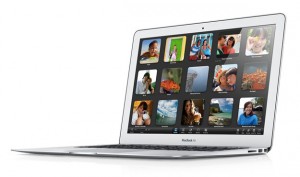 Today is a big day for Apple. They’ve released updated versions of their MacBook Air and the Mac Mini along with finally unleashing the Mac OS X Lion into the Mac App Store.
Their new MacBook Airs are now equipped with newer Sandy Bridge chips, Thunderbolt ports, and backlit keyboards. The 11-inch model includes a 1.6GHz Core i5 processor, 64GB of solid-state storage, 2GB of RAM, and starts at $999. The slightly larger 13-incher starts at $1,299 and includes a 1.7GHz Core i5 chip, 128GB of storage, and 4GB of RAM. Both variations have Intel HD 3000 graphics on board, as well as FaceTime webcams, two USB ports (SD slot on 13-incher), and of course the speedy Thunderbolt ports.
The Mac Mini line has received a similar internal upgrade with the addition of Sandy Bridge processors and Thunderbolt. The base model starts at $599 and includes a 2.3GHz Core i5 CPU, AMD Radeon HD graphics, 2GB of RAM, 500GB of hard-drive storage, and Turbo Boost 2.0, which allows you to easily overclock to 3.4GHz whenever you’re using resource-intensive programs. Apple also released a server version, which will cost you $999 and includes a Core i7 processor and has Mac OS X Lion Server on board.
Mac OS 10.7 Lion is now available in the Mac App Store and is ready to be downloaded and installed onto your Snow Leopard-equipped machine for only $29.99. Upgrading to Lion requires that you have an Intel Mac with a Core 2 Duo, Core i3, Core i5, or Core i7 processor, and at least 2GB RAM and 4GB of hard drive space. You also need to have Mac OS 10.6.8 Snow Leopard installed before you can upgrade to Lion.
In other less-known Apple news, the company also rolled out an updated version of their 27-inch display that comes packing with Thunderbolt, built-in 2.1 speakers, and an HD FaceTime webcam. There’s also a FireWire 800 port, Ethernet, three USB ports, MagSafe charging for your MacBook, and a single DisplayPort that’s capable of daisy-chaining six devices. Oh, and did we mention that the display rocks an awesome 2560 x 1440 resolution?
If you have a keen eye, you might have also noticed while surfing the online Apple Store that the infamous white MacBook is now kaput. It looks like no more plastic for Apple.
source:cnet
MOBILE REVIEWS

1. Samsung Galaxy S2
Come on, it's hardly surprising that the first phone to get five stars in over a year from TechRadar is now at the top of our best mobile phone chart.
What we love about the Samsung Galaxy S II is the sheer amount of stuff that's packed in under the chassis - but more important is the way Samsung has used all that tech to create a phone that just works near-flawlessly.
Check out our Samsung Galaxy S2 video review:
The dual-core 1.2GHz processor, the Super AMOLED plus screen and the excellent sonic performance of the media player all combine to make a real doozy of a mobile phone.
Recording in 1080p is a nice touch (given that it actually works most of the time) and the camera is more than enough to take great shots in a short space of time.
In short, be it internet browsing, navigation, photography, media, social networking or gaming - the Samsung Galaxy S2 is our pick of the bunch for all those functions in one phone.
Quick verdict
The Samsung Galaxy S2 is a phone we're excited to whip out in a pub and show off to our friends – it's the ultimate media mobile, the next generation in web browsing thanks to slick Flash integration, a very good replacement for a pocket camcorder and, goshdarnit, it makes calls pretty well too.
The Samsung Galaxy S II has not only set a new bar for smartphones in 2011; it's smashed the bar, recreated it in its own image and put it out of reach of the competition - although perhaps that will change when our HTC Sensation review comes around...

2. LG Optimus 2X
The dual-core race is set to hot up, and LG has stolen a march on its Atrix-shaped rival in the UK by releasing the Optimus 2X.
The new phone is certainly a slick player - we found the screen to be bright, the operation lightning fast at times and the HDMI mirroring a really neat feature.
You can check out our LG Optimus 2X video review:
If it wasn't for some odd 1080p recording issues and slightly juddery internet experience there's no doubt that the Optimus 2X would have been troubling the top of this chart - but you can forgive even those issues when you realise that it costs just £25 a month.
That's right. A mid-range price for a top end handset - we're really hoping this is a trend that continues.
Quick verdict
The idea of dual-core handsets is still better than the reality at the moment, as there still aren't many apps that can take advantage. That said, 1080p video recording and improved graphics performance are still winning features, and the LG Optimus 2X is all over these like a rabbit in a radish field.
3. HTC Wildfire
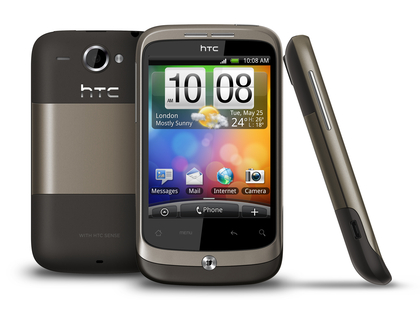
HTC might not have got budget phones right the first time round - remember the HTC Tattoo, forlornly stuck on Android 1.6? But the HTC Wildfire is a much bigger hit, essentially taking the HTC Desire and squishing it down and reducing the cost.
We were impressed with the HVGA screen and dinky dimensions - while the camera was only passable, the presence of the flash helped things greatly.
Essentially, it's a decent Android smartphone for not much cash - although it's going to be usurped by the new HTC Wildfire S which is smaller, faster and, more importantly, cheaper.
Quick verdict
Friendly on the pocket and even nicer on the wallet, the HTC Wildfire is set for a big price drop now the Wildfire S has emerged, so if you're thinking of upgrading to this, you could be rewarded for your patience.
The Best Antivirus Software for 2011 (So Far)
Premium Antivirus
 Ad-Aware Pro Internet Security 8.3 Ad-Aware Pro Internet Security 8.3 $29.95 direct or $39.95 for 3 licenses This isn't a big update for Ad-Aware, but its price drops and it's impressive at keeping malware from installing on a clean system. It doesn't do as well when challenged to clean up existing malware, however. |
 BitDefender Antivirus Pro 2011 BitDefender Antivirus Pro 2011 $39.95 direct for three licenses BitDefender Antivirus Pro 2011 is loaded with features that you'd normally find only in a full suite, most notable its superb phishing protection. It offers three distinct UI views and tons of configuration options. I'd just like to see more success in its central task of protecting against viruses and other malware. |
 Kaspersky Anti-Virus 2011 Kaspersky Anti-Virus 2011$59.95 direct for three licenses Kaspersky's latest antivirus looks better than ever, and independent labs consistently put it at or near the top. In my hands-on tests it scored well below what the labs would suggest, though, and it made a couple of serious faux pas false positives. |
 Outpost Antivirus Pro 7.0 Outpost Antivirus Pro 7.0 $24.95 for 3 licenses, direct Outpost Antivirus Pro 7.0 doesn't detect or remove malware quite as well as the competition. It offers many features to protect clean systems against malware infestation, but it also spews confusing popups for good programs and malware alike. It's not a bad program, but you can do better. |
 Panda Antivirus Pro 2011 Panda Antivirus Pro 2011$50.95 direct for three licenses; $40.95 for one Panda Antivirus Pro 2011 uses many techniques to keep viruses and other malware from invading your PC. As a bonus, it includes a fully functional two-way personal firewall. |
 Webroot AntiVirus with Spy Sweeper 2011 Webroot AntiVirus with Spy Sweeper 2011 $39.99 direct; $49.99 for 3 licenses Webroot's latest antivirus/antispyware utility was well worth the wait. It's been intelligently redesigned with an eye to simplicity, and it did very well in all aspects of testing, both malware cleanup and malware blocking. |
Free Antivirus
 digital defender free 2.0 digital defender free 2.0 Free Just because something's free doesn't mean it's a bargain. This nondescript antivirus won't cost you any money, but relying on it will cost you in reduced security. Some products do better at keeping a clean system clean than at rooting out entrenched malware; this one isn't good at either. |
 Immunet Protect Free 2.0 Immunet Protect Free 2.0Free If all your friends and contacts have antivirus protection you'll be safer. Immunet encourages and enables sharing free antivirus protection with your community. Alas, based on my testing its cloud-based protection does a poor job cleaning up malware and a so-so job protecting a clean system from infestation. |
Free When support agents from other vendors run into malware that foils their own product they frequently direct users to run Malwarebytes. I can see why—it's small, fast, and simple. This free product should definitely be in your toolbox. Just don't pay extra for real-time protection. |
 Panda Cloud Anti-Virus 1.1 Panda Cloud Anti-Virus 1.1 Free This free antivirus is great at keeping malicious software from installing on clean computers. It's less effective at cleaning up existing infestations, so, if it detects a threat, run another product for a second scrubbing. |
source PCmag.com

